Building a balcony drip irrigation system
My balcony is east-facing and covered, which means the pots see sun in the morning and never see rain. By July the lettuce is a memory and the tomatoes are stress-cracking. This year I built a small Pi-controlled drip system to take watering off my hands.
The setup is three zones — lettuce, tomatoes, raised bed — fed from a five-gallon reservoir through 1/4” tubing. A 12V pump provides pressure; three solenoid valves gate flow per zone; three capacitive moisture sensors in representative pots tell the Pi when each zone is dry enough. A float switch on the 12V positive line acts as a hardware cutoff if the reservoir runs out, so the pump physically cannot run dry no matter what the software is doing.
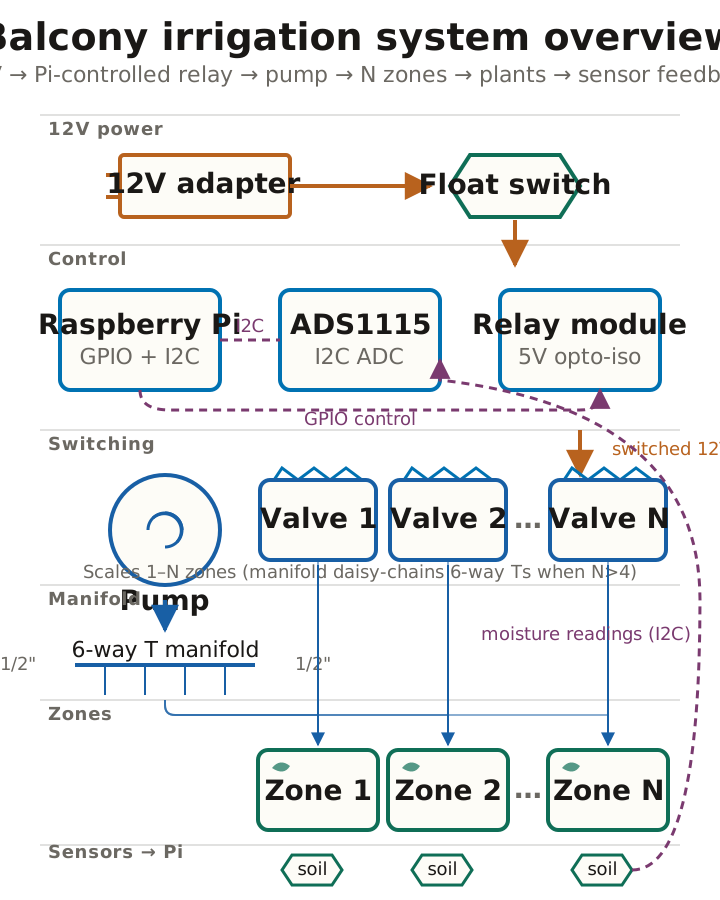
Cron runs the controller at 7 AM and 6 PM. For each zone it averages ten moisture readings, and if the soil is drier than a calibrated threshold, it waters in cycles — open valve, run pump for N seconds, close valve, wait 60 seconds for the water to soak in, re-read. Up to four cycles per zone before giving up.
Two surprises, in retrospect. The capacitive sensors drift far less than I expected — the cheap resistive ones I used in a previous version corroded inside a season; the $5 capacitive ones haven’t needed recalibration in two months. And the hardest part wasn’t the electronics, it was the plumbing. Pushing 1/4” tubing onto cold barbed fittings is a knuckle-skinning fight. Dipping the tubing end in hot water for ten seconds first turns it into a five-second job. I figured this out around fitting 30 of 47.
Once it was running I added a small Flask web UI on the Pi that shows
live moisture per zone with DRY/OK/WET color status — open
http://irrigator.local:8080/ from any phone on home WiFi. Meta-refresh
every 30 seconds, no JavaScript, nothing to install. A manual-water
override sits behind a query-string key, but the whole thing is LAN-only
by design — never port-forward it.
The full build guide is on the project page — parts, plumbing, wiring, calibration, scheduling, and the troubleshooting flowchart.