01 Overview
01 Overview
A 5-gallon bucket, a 12V pump, a Raspberry Pi, and about 47 push-fit fittings water 14 plants on a covered Seattle balcony — three zones, capacitive moisture sensors per zone, cron-driven, with a hardware float-switch cutoff so the pump physically can’t run dry. Roughly $170 in parts and a weekend to build.
The guide is written for a first-time builder who’s comfortable with a screwdriver and willing to read a Python script. You don’t need to know electronics or plumbing going in — both are explained as you hit them. If you already know one, the skill toggle (top of every page) skips the explainers and leaves the procedure.
The architecture, in a picture
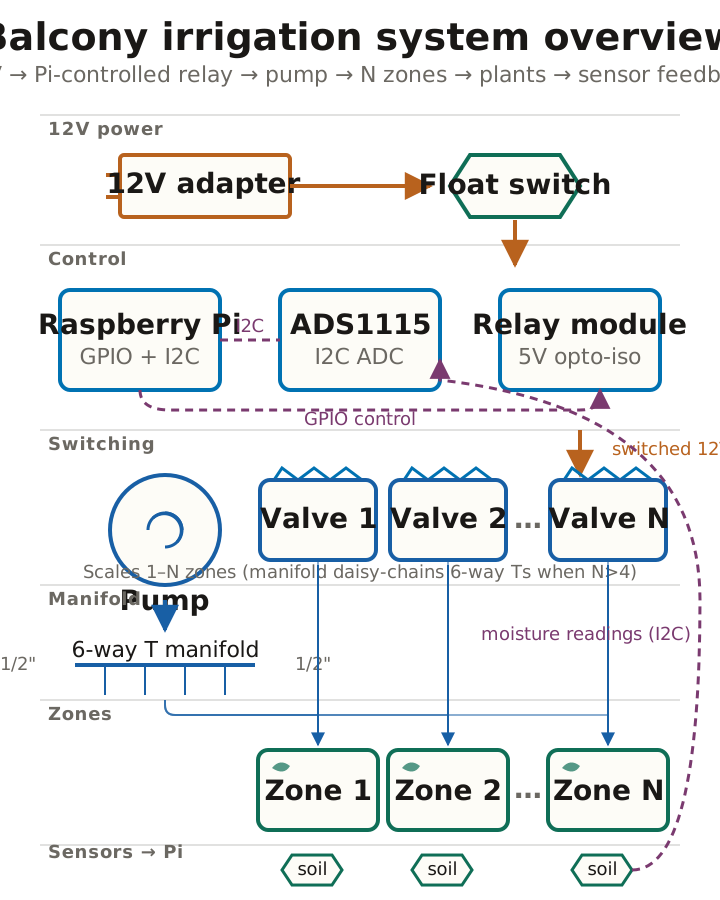
Page 05 covers the plumbing in detail; page 08 covers the electronics. The diagram above is canonical — every later page zooms into one piece of it.
How the watering works
Cron fires a Python script on the Pi once or twice a day. For each zone, the script averages ten moisture readings, compares against a calibrated dry threshold, and — if the soil’s dry — opens that zone’s valve, runs the pump for a configured number of seconds, closes the valve, waits 60 seconds for soak-in, and re-reads. Up to four cycles per zone before it gives up. Every run ends in a finally block that turns every relay off, so a crash mid-cycle leaves the system safe.
That’s the whole control loop — no scheduling beyond cron, no machine learning, no cloud. The Pi reads three numbers and decides whether to open three valves.
What’s a cron?
Cron is the standard Linux task scheduler. You tell it “run this command at 6 AM every day,” and it does, even after reboots. You’ll set up one cron entry on page 12.
The skill toggle
The pill at the top of this page (top-right on desktop, bottom-right on mobile) sets how much explainer text you want.
- Novice — full explainers. “What’s a cron?” sidebars, decision trees, inline glossary expansions, primers on soldering and crontab syntax.
- Intermediate — procedure plus brief reminders. The default for first-time visitors.
- Advanced — procedure only. Page 07 (soldering tutorial) is skipped entirely in the page navigation — Next on page 06 jumps to page 08.
Your choice persists across pages and across browser sessions, stored in your browser’s localStorage. No account, no tracking. If JavaScript is disabled, the page renders at the intermediate default and you read the guide without filtering.
What if you get stuck?
Time and money
| What | How much |
|---|---|
| Parts (Pi already on hand) | ~$170 |
| Tools you may need (drill bit, crimper) | ~$30 |
| Plumbing day | ~3 hours |
| Electronics day | ~3 hours |
| Software day | ~2 hours |
Call it a weekend if you go straight through, or three relaxed evenings if you don’t. The plumbing takes longest the first time — pushing 1/4” tubing onto cold barbed fittings is a knuckle-skinning fight until you discover the hot-water trick on page 05. Budget extra time on day one accordingly.
When you’re ready, page 02 has the planner — draw your balcony, drop your containers, and the BOM updates live so you know exactly what to buy.