08 Electronics
08 Electronics
The plumbing works; now the electronics. This page covers the relay-to-Pi jumpers (six wires), the 12V power distribution through the float switch (the hardware safety net for runaway pumps), and the moisture-sensor wiring (three sensors via the ADS1115 ADC). The diagrams below are the canonical reference; the procedures lift from the v1 build guide. Plan on about ninety minutes if everything is laid out, longer if this is your first time pushing jumpers onto a Pi header.
Disconnect the 12V power before wiring anything. Bare 12V wires touching a Pi pin will fry the SoC. The Pi can stay powered for the relay-jumper wiring (steps 1–2 below); only plug in the 12V adapter AFTER the pre-flight checklist passes.
GPIO pinout
The Pi’s 40-pin GPIO header carries the relay control signals (4 pins), the I2C bus to the ADS1115 (2 pins), the 5V relay power (1 pin), the 3.3V sensor power (1 pin), and ground (shared, at least 1 pin used). Twelve pins total — highlighted in the diagram below.
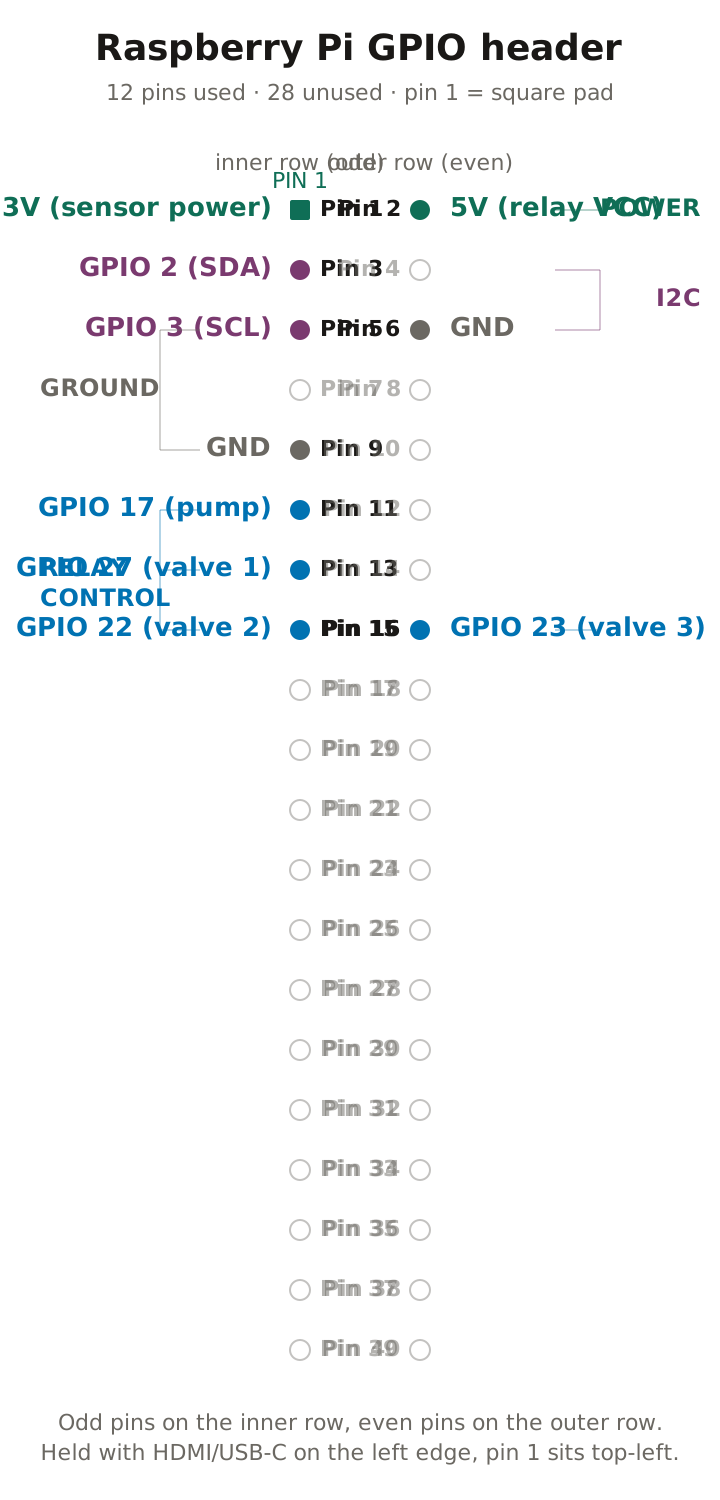
Pin 1 sits at the corner with the square solder pad on the underside. Most Pi cases include a header label you can read off; if yours doesn’t, count from the corner with the square pad and you can’t go wrong.
Pi → relay jumper map
| Pi GPIO (BCM) | Pi physical pin | Relay module pin | Controls |
|---|---|---|---|
| GPIO 17 | Pin 11 | IN1 | Pump |
| GPIO 27 | Pin 13 | IN2 | Valve 1 (lettuce) |
| GPIO 22 | Pin 15 | IN3 | Valve 2 (tomatoes) |
| GPIO 23 | Pin 16 | IN4 | Valve 3 (raised bed) |
| 5V | Pin 2 | VCC | Relay power |
| GND | Pin 6 | GND | Relay ground |
Female-to-female jumper wires are the right cable for this — they push onto both the Pi header and the relay screw terminals. Six jumpers total. The SVG above shows where each pin physically sits on the header; the table tells you what role each pin plays — GPIO 17 → IN1 controls the pump, and so on.
Why does the relay “click”? Each relay channel has a tiny electromagnet that pulls a metal contact against another metal contact when the GPIO line goes LOW (yes, LOW — most opto-isolated relay modules are active-low). The “click” is that physical contact closing. Click means current is now flowing from COM to NO; no click means COM is connected to NC instead.
What does COM / NO / NC mean? A relay is a switch with three terminals: COM (common, the always-connected wire), NO (normally open — disconnected from COM until the relay clicks), and NC (normally closed — connected to COM until the relay clicks; when it does click, NC disconnects and NO connects). For irrigation: 12V adapter (+) → COM; pump or valve red wire → NO. Relay clicks → 12V flows. Relay doesn’t click (or the Pi loses power) → no 12V flows. Fail-safe geometry.
Relay-to-Pi wiring
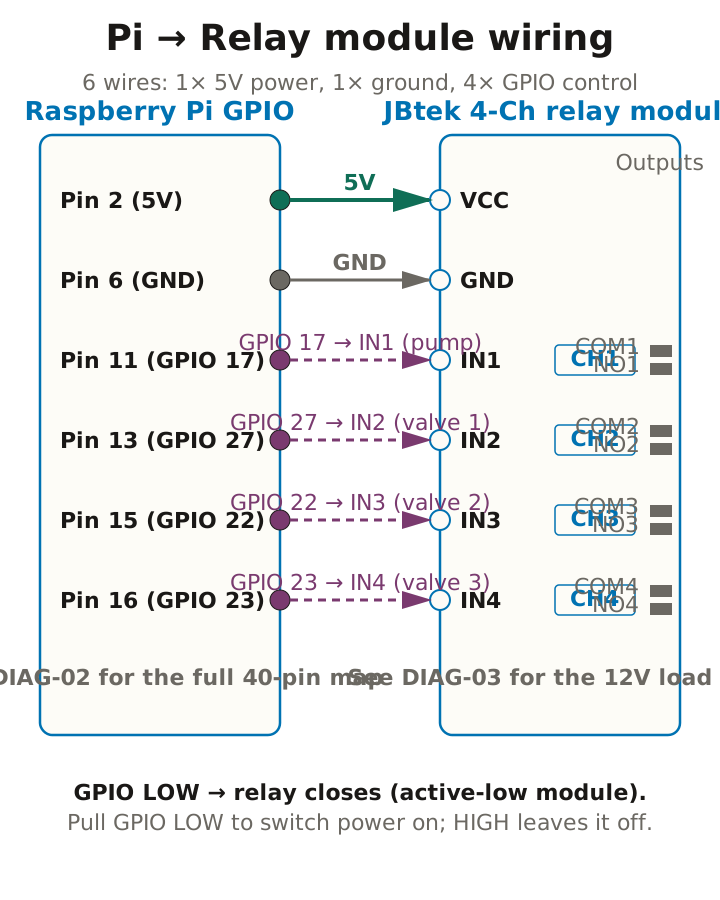
With the Pi powered off:
- Slide each female-to-female jumper onto the Pi header pin per the table above. Push straight down — the pins are 0.1” pitch and bend if you angle the jumper.
- Push the other end onto the matching relay module pin (IN1, IN2, IN3, IN4, VCC, GND). The relay module’s pin block is the same 0.1” pitch as the Pi header, so the same jumpers fit both ends.
- Tug-test each jumper. A loose pin under vibration is the most common intermittent-failure cause on this build — five seconds of tugging now saves an afternoon of debugging in August.
That’s the entire Pi-to-relay wiring. The relay-to-loads wiring (pump + valves) uses the COM and NO terminals on the relay’s output side; that’s the next section.
12V power distribution
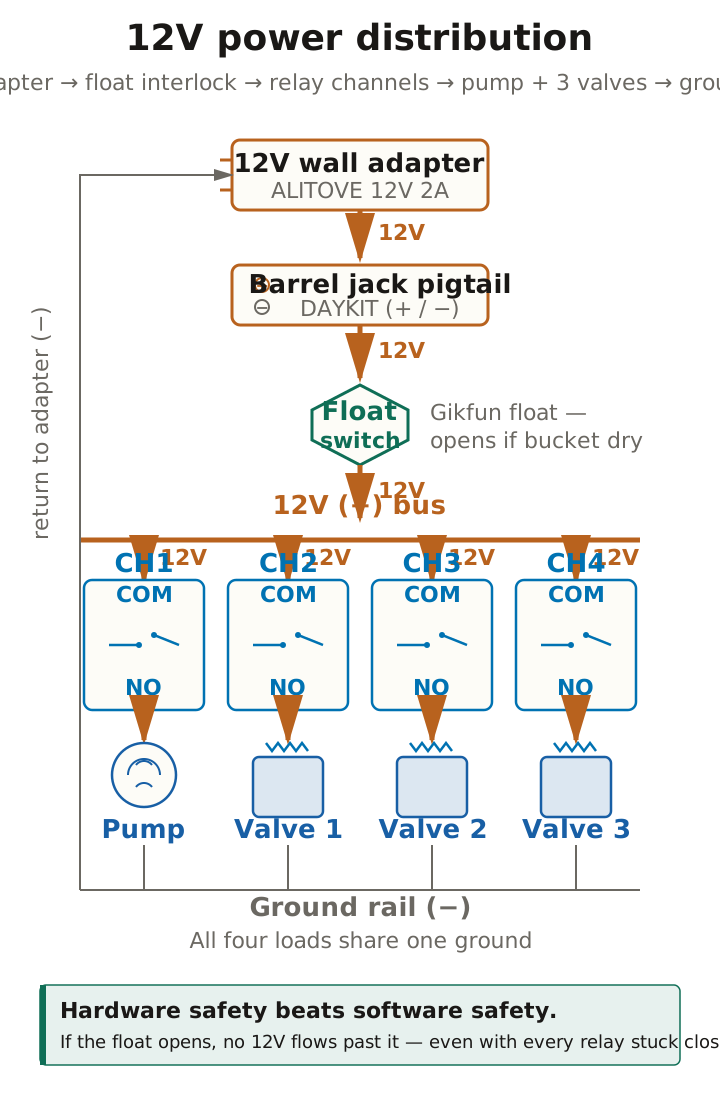
With the 12V adapter still UNPLUGGED:
- Plug the 12V adapter into the barrel-jack pigtail. The pigtail’s screw terminals give you
+and−to work from. - Wire the float switch in series on the positive line: 12V (+) → float switch wire A; float switch wire B → distribution point. Polarity doesn’t matter for the float switch itself (it’s just a contact), but consistency in wire colour will save you a multimeter session next year when you’ve forgotten which wire is which.
- From the distribution point, run 12V positive to FOUR destinations using a terminal strip or twist-and-solder:
- Relay CH1 COM (pump)
- Relay CH2 COM (valve 1)
- Relay CH3 COM (valve 2)
- Relay CH4 COM (valve 3)
- From each relay’s NO terminal, run a wire to the device it controls:
- CH1 NO → Pump red wire (+)
- CH2 NO → Valve 1 red wire (+)
- CH3 NO → Valve 2 red wire (+)
- CH4 NO → Valve 3 red wire (+)
- Connect ALL ground (−) wires together and back to the 12V adapter (−): pump, all three valves, and the 12V adapter return. A second terminal strip is the cleanest way to do this; a single twist-and-solder bundle works too if you cover it in heat-shrink afterwards.
- Tug-test every screw terminal. Vibration plus loose copper plus 12V is how you start a fire on a balcony in July.
If the bucket runs dry, the float drops, the switch opens, and the 12V line breaks. The pump physically can’t run dry because there’s no power available to it. This is hardware redundancy on top of the Pi-driven cron schedule — the software might command the pump on, but the float says no, and the float wins.
Moisture sensors and the ADS1115
The capacitive moisture sensors output an analog voltage that the Pi can’t read directly (the Pi has no analog inputs of its own). The ADS1115 ADC bridges them — three sensors plug into channels A0, A1, and A2; the Pi reads the digital values via I2C at address 0x48.
ADS1115 → Pi
| ADS1115 pin | Pi destination |
|---|---|
| VDD | Pi 3.3V (Pin 1) |
| GND | Pi GND (Pin 9 or any GND) |
| SCL | Pi GPIO 3 / SCL (Pin 5) |
| SDA | Pi GPIO 2 / SDA (Pin 3) |
| ADDR | Pi GND (sets I2C address to 0x48) |
Sensor → ADS1115
| Sensor | VCC | GND | AOUT → ADS1115 |
|---|---|---|---|
| Sensor 1 (lettuce pot) | Pi 3.3V | Pi GND | A0 |
| Sensor 2 (tomato pot) | Pi 3.3V | Pi GND | A1 |
| Sensor 3 (raised bed) | Pi 3.3V | Pi GND | A2 |
Use the breadboard to create shared 3.3V and GND rails for all three sensors; only the AOUT line needs to be unique per sensor.
Cable runs. Each sensor needs to reach from the Pi enclosure to its pot. That’s three sets of three-wire cables running across the balcony (about 2–4 ft for a lettuce pot, 3–6 ft for tomatoes, 5–8 ft for the raised bed). Solder or crimp extensions onto the sensor’s short factory leads — 22 AWG stranded works well; refer back to page 07 for the soldering technique. Run the sensor cables SEPARATELY from the 12V pump and valve lines: parallel high-current wires induce noise on the analog signal, and a noisy moisture reading produces phantom watering events. Zip-tie sensor cables along the railing, under the drip tubing, on the opposite side of the railing from the 12V bundle. Protect every exposed solder joint with heat-shrink tubing.
Sensor positioning. Push each sensor vertically into the soil to the line marked on the sensor’s PCB (about two-thirds of the way up the sensing area). The electronic components at the top of the sensor must stay ABOVE the soil surface — bury them and water creeps in along the conformal coating, the readings drift, and the sensor dies in a month. Pick a representative pot for each zone (the middle of the row, not the driest corner, not directly under an emitter). For the raised bed, position the sensor in the peas section since that’s the majority of the bed and the thirstiest section.
Enclosure and mounting
Use the Otdorpatio IP65 weatherproof enclosure (or any IP65-rated equivalent — the rating matters more than the brand). Drill cable entries on the bottom face only — water can’t drip into a hole that points downward. Glue around each cable with RTV silicone for outdoor sealing; let it cure for at least four hours before the first rain. Route everything in from below: Pi USB-C, 12V barrel jack, three sensor cables, three valve cables, two pump wires. Position the enclosure under the roof overhang, on a shelf or wall mount, never anywhere water can pool around it.
Pre-flight checklist
Before plugging in the 12V adapter, verify all of these:
- No 12V wire touches any 3.3V or 5V Pi pin.
- The relay module’s VCC goes to the Pi’s 5V (Pin 2), not to 12V.
- All ground connections are tied together and shared across both supplies (Pi GND ↔︎ relay GND ↔︎ 12V adapter return).
- Every screw terminal has been tug-tested — no loose wires.
- Each solenoid has a 1N4001 flyback diode across its coil (cathode = stripe = +12V side).
- Nothing is under tension; cables route through the strain reliefs.
If any item fails, stop and re-check. The most common mistake on first builds is shorting 12V to 3.3V — that fries the SoC and ends the build. The pre-flight is two minutes; a new Pi is forty pounds and a week of waiting.
First power-on test
The test runs in two phases: relay-only (Pi powered, 12V still off) so you can confirm the GPIO wiring without risking the loads, then per-zone (12V on) once the relays click on command.
- Plug in the Pi power supply. Wait for it to boot (~30 seconds).
- Plug in the 12V adapter.
- Listen — nothing should happen. All four relays should be open (pump off, valves closed). If you hear a relay click on power-on with no GPIO command, that’s a wiring issue: probably ground continuity through an unintended path.
- From the Pi terminal (
ssh [email protected]or a directly attached keyboard), test each relay manually. The pump relay (GPIO 17) is the loudest:
# Toggle the pump relay (GPIO 17) on for 2 seconds
python3 -c "
import RPi.GPIO as GPIO
import time
GPIO.setmode(GPIO.BCM)
GPIO.setup(17, GPIO.OUT)
GPIO.output(17, GPIO.LOW)   # Active-low: LOW closes the relay
time.sleep(2)
GPIO.output(17, GPIO.HIGH)
GPIO.cleanup()
print('Pump toggled on for 2 seconds.')
"
You should hear the relay click and the pump hum for two seconds. No water should flow because all the valves are still closed.
- Repeat the test with pin 27, then 22, then 23 — confirm each relay clicks and the corresponding valve opens audibly (solenoid valves give a soft thunk when they energize).
- Full-zone test. Open valve 1 (GPIO 27) AND the pump (GPIO 17) simultaneously. Water should flow through the lettuce zone for five seconds:
python3 -c "
import RPi.GPIO as GPIO
import time
GPIO.setmode(GPIO.BCM)
for pin in [17, 27]:
    GPIO.setup(pin, GPIO.OUT)
GPIO.output(27, GPIO.LOW)   # Open valve 1 first
time.sleep(0.5)
GPIO.output(17, GPIO.LOW)   # Then start the pump
time.sleep(5)               # Water flows for 5 seconds
GPIO.output(17, GPIO.HIGH)  # Stop pump
time.sleep(0.5)
GPIO.output(27, GPIO.HIGH)  # Close valve 1
GPIO.cleanup()
print('Zone 1 test complete.')
"
Confirm water flows to the lettuce pots ONLY. If water comes out of the wrong zone, you have valve wiring swapped — see Stuck? below.
Verify the I2C bus
sudo i2cdetect -y 1You should see 48 highlighted in the grid (the ADS1115’s I2C address). If you see nothing, check SDA and SCL wiring and confirm I2C is enabled on the Pi (page 09 covers raspi-config — but the setup-pi.sh script enables I2C automatically the first time it runs).
With the electronics wired and the relays passing manual tests, page 09 walks the Pi setup: flashing Pi OS Lite, SSH, and the one-shot setup-pi.sh script.